How to use Polymarket in the US (sign up, deposit, trade)
Polymarket's US app is on iPhone. How to get set up, deposit and claim the welcome offer.
Short answer: US users trade Polymarket through the Polymarket US iPhone app, which is regulated by the CFTC. Download it from the App Store through our link, sign up, enter promo code WIN, verify your identity and deposit. The international polymarket.com site isn't for US residents.
Polymarket offer, checked 27 September 2026
Deposit $10, get a $50 trading bonus
Promo code: WIN
iPhone app only. 18+ only. Restrictions and eligibility requirements apply. Not available in all jurisdictions. Trading is risky. 100% loss can occur. See polymarket.com/tos for more information. The Polymarket US App serves as an independent software provider and affiliate of Polymarket US and Polymarket Clearing, the CFTC-regulated exchange and clearing organization. Terms apply.
Before you start
- iPhone only (for now). There's no US Android app yet (checked 27 September 2026).
- Be in an eligible state. Most states are supported; the app confirms where you are.
- Have your ID handy for identity verification.
Step by step
- Get the app. Tap Get Polymarket on your iPhone, or search "Polymarket" in the App Store.
- Create your account with your email or Apple ID.
- Enter promo code
WINwhen asked for a code. - Verify your identity: name, date of birth, address, and the last digits of your Social Security number. You may be asked for an ID photo.
- Deposit. Choose a payment method in the app. The current offer is Deposit $10, get a $50 trading bonus.
- Pick a market and read its rules. Buy Yes or No, set the amount and confirm.
Polymarket US vs Polymarket international
| Polymarket US app | polymarket.com (international) | |
|---|---|---|
| For | US residents | Non-US users (blocked in some countries) |
| Regulation | CFTC | Offshore |
| Devices | iPhone | Web, apps |
| Money | US dollars | USDC stablecoin |
The international site says this plainly. Before you can trade there, you have to tick a box confirming you are not a U.S. person and not located in the U.S. (screenshot from polymarket.com, 27 September 2026):
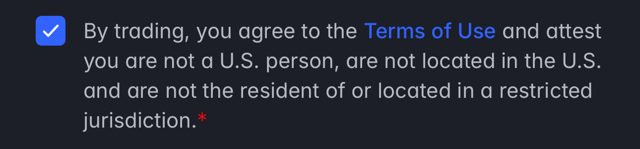
If you live in the US, that box isn't for you: use the Polymarket US app instead.
Using a VPN to reach the international site from the US breaks its terms and can get your account frozen. Don't.
Frequently asked questions
Is Polymarket legal in the US?
Yes. Polymarket returned to the US through a CFTC-regulated exchange, and US users trade through the Polymarket US app.
Can I use Polymarket on Android in the US?
Not yet (checked 27 September 2026). Android users can use Kalshi, OG or ProphetX instead.
What's the Polymarket promo code?
WIN, currently for Deposit $10, get a $50 trading bonus. Full terms: Polymarket promo code.